Friday, 17 August 2012

Invalid Action Error - Microsoft Dynamics CRM 2011

When i try to open my CRM, i got the below error


Then i opened the log in Event Viewer, i got the error message
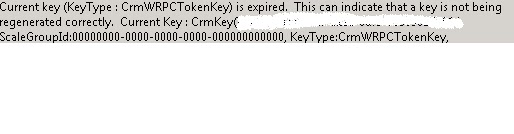
Solution : I started the Microsoft Dynamics CRM Asynchronous Processing Service and Microsoft Dynamics CRM Asynchronous Processing Service (maintenance) in services.msc.

Note : Also try iisreset

I got this solution from nishant rana blog.  http://nishantrana.wordpress.com/2008/06/11/invalid-action-error-microsoft-dynamics-crm-40/.


Happy Tracing........


Thursday, 19 July 2012

Adding same field more than one time in 2011 CRM form.

There is one more good feature introduced in CRM 2011, that is adding the same field more than one time in single form. But while implementing java script, it is causing some problems. For eg: I have 'Name' field two times in a form, i want to hide the second field based on some condition. But if we apply javascript for that field name it will hide both the fields. So the simple way is to add number to the fieldname.


  Eg :


Xrm.Page.getControl('name').setVisible(true);
Xrm.Page.getControl('name1').setVisible(false);


This will work.


Happy CRMing........

Monday, 18 June 2012

Hiding Ribbon in CRM 2011

To hide the ribbon and to hide the empty space at the top and left side navigation.


window.top.document.getElementById("crmTopBar").style.display = "none";  //Hiding ribbon tool bar
document.getElementById("crmNavBar").parentElement.style.display = "none";  //hiding left side nav
document.getElementById("tdAreas").parentElement.parentElement.parentElement.parentElement.colSpan = 2; 
document.getElementById("recordSetToolBar").parentElement.style.display = "none";  //Hiding tool bar
document.getElementById("crmFormFooter").parentElement.style.display = "none"; //Hiding footer

Friday, 8 June 2012

Hiding Navigation in CRM 2011

To hide the navigation option in CRM 2011, we can use the below function.

Ex: I am hiding 'RelationShips' Options from Opportunity Navigation.


HideRelationshipsNav("Relationships");

function HideRelationshipsNav() {
        var navBar = document.getElementById("crmNavBar");
        if (!navBar) return;
        var optionItems = navBar.getElementsByTagName("nobr");
        var exitCount = 0;
        for (opt = 0; opt < optionItems.length; opt++)
            for (a = 0; a < arguments.length; a++)
            if (optionItems[opt].innerText == arguments[a]) {
            optionItems[opt].parentNode.style.display = "none";
            exitCount++;
            if (exitCount == arguments.length) return;
        }
    }


Happy Tracing !!!!!!!!!!!!!!!

Sunday, 3 June 2012

'Access denied' While Accessing CRM Current User Role

I faced some problem while accessing the CRM Current user role with the below code snippet. Then i did some research and found the solution for the same.

 function UserHasRole(roleName) {
             var serverUrl = Xrm.Page.context.getServerUrl();
             var oDataEndpointUrl = serverUrl + "/XRMServices/2011/OrganizationData.svc/";
            oDataEndpointUrl += "RoleSet?$top=1&$filter=Name eq '" + roleName + "'";

            var service = GetRequestObject();
            if (service != null) {
                service.open("GET", oDataEndpointUrl, false);
                service.setRequestHeader("X-Requested-Width", "XMLHttpRequest");
                service.setRequestHeader("Accept", "application/json, text/javascript, */*");
                service.send(null);

                var requestResults = eval('(' + service.responseText + ')').d;
                if (requestResults != null && requestResults.length == 1) {
                    var role = requestResults[0];
                    var id = role.RoleId;
                    var currentUserRoles = Xrm.Page.context.getUserRoles();

                    for (var i = 0; i < currentUserRoles.length; i++) {
                        var userRole = currentUserRoles[i];
                        if (GuidsAreEqual(userRole, id)) {
                            return true;
                        }
                    }
                }
            }

            return false;
        }


When the user tries to execute the code, he/she will get 'Access denied' Error in CRM page.

Solution :

To resolve this error, we need to replace the 'var serverUrl = Xrm.Page.context.getServerUrl();' code with the 'var serverUrl = "/" + Xrm.Page.context.getOrgUniqueName();'.

Happy Tracing......

To Retrieve Logged In User CRM Role

Below is the code snippet which will bring the current logged in user crm role.

var has_role = UserHasRole('Sales Representative');
function UserHasRole(roleName) {
            var serverUrl = "/" + Xrm.Page.context.getOrgUniqueName();
            var oDataEndpointUrl = serverUrl + "/XRMServices/2011/OrganizationData.svc/";
            oDataEndpointUrl += "RoleSet?$top=1&$filter=Name eq '" + roleName + "'";
            var service = GetRequestObject();
            if (service != null) {
                service.open("GET", oDataEndpointUrl, false);
                service.setRequestHeader("X-Requested-Width", "XMLHttpRequest");
                service.setRequestHeader("Accept", "application/json, text/javascript, */*");
                service.send(null);
                var requestResults = eval('(' + service.responseText + ')').d;
                if (requestResults != null && requestResults.length == 1) {
                    var role = requestResults[0];
                    var id = role.RoleId;
                    var currentUserRoles = Xrm.Page.context.getUserRoles();
                    for (var i = 0; i < currentUserRoles.length; i++) {
                        var userRole = currentUserRoles[i];
                        if (GuidsAreEqual(userRole, id)) {
                            return true;
                        }
                    }
                }
            }
            return false;
        }
        function GetRequestObject() {
            if (window.XMLHttpRequest) {
                return new window.XMLHttpRequest;
            }
            else {
                try {
                    return new ActiveXObject("MSXML2.XMLHTTP.3.0");
                }
                catch (ex) {
                    return null;
                }
            }
        }
        function GuidsAreEqual(guid1, guid2) {
            var isEqual = false;
            if (guid1 == null || guid2 == null) {
                isEqual = false;
            }
            else {
                isEqual = guid1.replace(/[{}]/g, "").toLowerCase() == guid2.replace(/[{}]/g, "").toLowerCase();
            }
            return isEqual;
        }

Friday, 18 May 2012

To Retrieve Option Set Selected Text Value in CRM 2011


To get the Pick list value ........

Xrm.Page.getAttribute("wi_opportunityprobability").getValue();

To retrieve the Option Set selected text .......

Xrm.Page.getAttribute("wi_opportunityprobability").getText();